How to Apply Jafza Gate Pass Online (Complete Guide)
You have a delivery, meeting, or interview inside Jebel Ali Free Zone (JAFZA). You drive to the gate. The officer asks for your pass. You don’t have one. Your trip stops right there.
I have helped logistics teams submit over 200 gate pass applications. The biggest mistake? People think they can just show up. You cannot.
The good news is that applying online takes less than 15 minutes. The system is called Tasreeh. It runs 24/7. Your pass arrives by email and SMS once approved.
This guide covers everything: benefits, gate locations, step‑by‑step application, common mistakes, alternatives, and answers to real questions.
AI Overview (Quick Answer)
How do I apply for a Jafza gate pass online?
- Visit tasreeh.ae → Open the official JAFZA gate pass portal in your browser.
- Create an account → Register using your name, email, mobile number, and ID details.
- Select host company → Choose the JAFZA-based company you are visiting from the approved list.
- Choose pass type → Select duration based on purpose: day pass, weekly pass, or monthly pass.
- Upload documents → Submit Emirates ID or passport copy along with a recent passport-size photo.
- Make payment online → Pay the required fee securely using card or digital payment options.
- Host approval required → Your selected company must review and approve your request first.
- Receive pass → Once approved, your digital gate pass is sent via email/SMS within up to 24 hours.
Key points:
- You must have a registered JAFZA host company.
- Day passes cost AED 20–50; longer passes cost AED 100–500.
- Upload files under 500 kB each (PDF, JPG, PNG).
- Your pass works only for the gate you select.
- Show the pass on your phone or printed copy, plus your original ID.
- Up to 10 people can be added to one application.
- Fees are non‑refundable if rejected.
Benefits of a Jafza Gate Pass
- Save time – Without a pass, you wait 30–60 minutes at Gate 7. With a pass, you clear the gate in under two minutes.
- Avoid rejection – Security can turn away anyone without a valid pass. I have seen delivery vans refused because the driver had only a verbal confirmation.
- Plan multiple visits – A weekly or monthly pass means one application for many entries.
- Add up to 10 people – Bring your whole team on one request. Each person gets their own pass.
- Digital copy works – Show the pass on your phone. No need to print.
- Track status online – See “Pending Host Approval”, “Approved”, or “Rejected” in real time.
Where Is Jafza Gate and How Many Are There?
JAFZA has 8 main vehicle gates and 2 pedestrian‑only gates. The most used are Gates 01 through 07. Here is a quick guide:
- Gate 1 – Southern section, near Logistics Park. Best for cargo trucks and light industrial units.
- Gate 2 – Main entrance, near JAFZA Metro Station. Best for offices and visitor centre.
- Gate 3 – Northern section. Best for heavy trucks and after‑8 PM entry.
- Gate 4 – East side, near Dubai Industrial City (best for manufacturing). See our JAFZA Gate 4 Guide for driving directions and lane rules.
- Gate 5 – Western side. Restricted – employees only.
- Gate 6 – South‑east. Best for contractors and maintenance vehicles.
- Gate 7 – Pedestrian and on‑site pass issuance. Last resort for walk‑ins.
- Gate 8 – Far north. Best for oversized cargo.
Important: Your online pass is valid only for the gate you selected. If you pick Gate 1 but drive to Gate 2, security will reject you. Always confirm the correct gate with your host company.
Read This Also ” JAFZA Gates: Complete Expert Guide “
How to Apply – Step by Step
Step 1 – Go to tasreeh.ae
Do not use any third‑party website. The official portal has a blue and white PCFC logo.
Step 2 – Create an account
Click “Register”. Enter your full name, email, UAE mobile number, Emirates ID or passport number, nationality, and company name (if any). Confirm your email.
Step 3 – Select the host company
Type the company name or trade license number. Only JAFZA‑registered companies appear. Double‑check spelling. A wrong selection delays approval by days.
Step 4 – Choose your pass type
- Visitor Pass (1 day) – meetings, interviews
- Day Pass (1 day) – one‑time delivery
- Weekly Pass (7 days) – contractors
- Temporary Pass (1–6 months) – ongoing projects
- Permanent Pass (1 year) – regular daily access
- Tools & Equipment Pass – bringing tools or cameras inside
Step 5 – Enter your details
Fill in your name, ID number, nationality, mobile, email, and vehicle plate (if driving). Click “Add Visitor” to include up to 9 more people.
Step 6 – Upload documents
- For any pass: Emirates ID copy (front & back) OR passport copy + recent colour photo (2×2 inches, white background)
- For drivers: vehicle registration card (mulkiya)
- For contractors: trade license copy + work permit
- File types: PDF, JPG, PNG. Maximum 500 kB per file. Compress large photos online.
Step 7 – Pay the fee
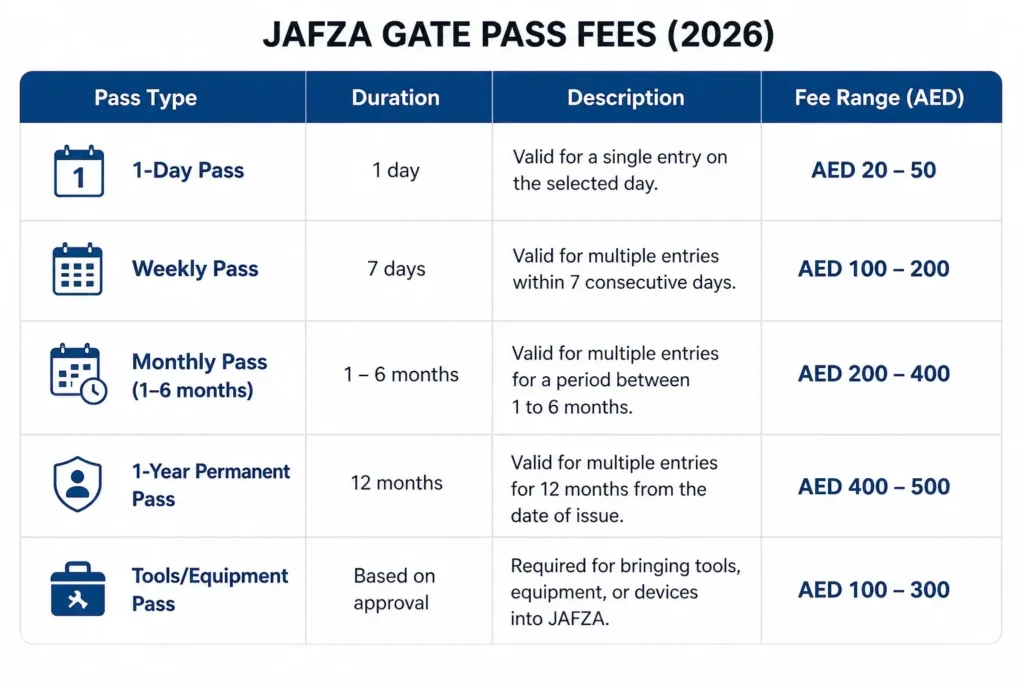
Fees are non‑refundable. Current rates (2026):
- 1‑day pass: AED 20–50
- Weekly pass: AED 100–200
- Monthly pass (1–6 months): AED 200–400
- 1‑year permanent pass: AED 400–500
- Tools/Equipment pass: AED 100–300
Pay by credit card, debit card, or digital wallet.
Step 8 – Wait for approval
After you submit, your host company gets an email to accept or reject you. Call or message them immediately – do not assume they will see it. Once they accept, PCFC security reviews. Day passes are approved within 24 hours. Longer passes may take up to one week.
You will receive a PDF by email and a download link by SMS. Show it on your phone or print. Keep your original ID ready at the gate.
Common Mistakes That Delay Approval
- Mistake 1 – Applying without host knowledge
Your application sits for days because your host never checked their email.
Fix: Call your host right after submitting. Say, “Please log in to Tasreeh and accept my request.” - Mistake 2 – Wrong gate selection
Your pass says Gate 1. You go to Gate 2. Rejected.
Fix: Ask your host, “Which gate should I select?” Then stick to it. - Mistake 3 – Oversized files
Files over 500 kB are silently rejected. Your application stays “Pending” forever.
Fix: Check file size before uploading. Use a free online compressor if needed. - Mistake 4 – Expired passport or visa
The system checks expiry dates. A passport with less than three months validity is rejected.
Fix: Renew soon‑to‑expire documents first. - Mistake 5 – Wrong pass type for your job
Training passes cannot be issued for Drivers, Masons, Sanitation workers, or Warehouse staff.
Fix: Select a standard Visitor Pass instead.
Alternative Ways to Get a Pass
Option A – Your host company applies for you
JAFZA companies can use their Dubai Trade Portal admin account to apply on your behalf. You do not need a Tasreeh account.
Option B – Jafza mobile app
Download the official Jafza App (iOS/Android). Companies and regular visitors can apply and receive passes directly in the app.
Option C – On‑site at Gate 7 (last resort)
Go to Gate 7 with your original Emirates ID or passport, a passport photo, and your host’s company name. Wait time is 30–60 minutes. Not guaranteed.
Frequently Asked Questions
1. How long does approval take?
Day passes: within 24 hours. Weekly/monthly passes: up to one week. One‑year passes: up to one month.
2. Can I apply without a host company?
No. You must select a registered JAFZA host company. They must accept your request.
3. How much does it cost?
AED 20–50 for one day, AED 100–200 for a week, AED 200–400 for monthly, AED 400–500 for one year.
4. What if my request is rejected?
You get an email explaining why. The fee is not refunded. Correct the error and reapply with a new payment.
5. Can I use the same pass for multiple gates?
No. Your pass works only for the gate you selected during application.
6. Is a digital pass on my phone accepted?
Yes. Security accepts phone screens. Keep a printed backup in case of network issues. Always carry your original ID.
7. Can I visit two different companies with one pass?
No. Each pass is tied to one host company. You need separate passes.
8. How do I check my application status?
Log in to tasreeh.ae and go to “My Requests”. Statuses: Pending Host Approval, Pending Security Review, Approved, Rejected.
9. What if I lose my pass after approval?
Log in and download the PDF again. It is always in your account. Or check your email.
10. Do children need a pass?
Yes. Every person entering JAFZA must have a pass. Add children as additional visitors in the same application.
11. Can I use my Emirates ID instead of a passport?
Yes, for UAE residents. Use Emirates ID (front and back). Tourists must use a passport copy.
12. What is the difference between Tasreeh and Dubai Trade Portal?
Tasreeh is for visitors. Dubai Trade Portal is for JAFZA‑registered companies to apply for you.
13. Can I apply from outside the UAE?
Yes. The Tasreeh portal works worldwide. You still need a host company inside JAFZA to approve you.
14. What are peak hours at Jafza gates?
Sunday to Wednesday: 7:30–9 AM and 4–6 PM. Thursday afternoons are very busy. Friday mornings are quiet.
15. Is there a customer support number?
Yes. Call PCFC customer service at 800‑PCFC (800‑7232). Sunday to Thursday, 8 AM to 4 PM.
Conclusion
Applying for a Jafza gate pass online is simple if you follow the steps. The most important rule: get your host company to accept your request immediately – that is where most applications fail.
Your action plan:
- Confirm the correct gate and host company name.
- Gather your documents. Compress files under 500 kB.
- Go to tasreeh.ae Create an account.
- Fill in details. Choose pass type. Pay.
- Call your host to accept the request.
- Receive your pass by email within 24 hours.
- Show your pass (digital or printed) plus original ID at the gate.
Do this, and you will drive through any Jafza gate without delay.